QR does not draw the letters A, B and C into little squares. It converts the message into a bit stream, adds information needed by a reader, and distributes the result around reserved structural patterns. For new QR("ABC123", 1), this repository chooses alphanumeric mode and error-correction level H. Its version policy fixes H for versions 1–3, Q for 4–9, M for 10–13 and L for 14–40; the constructor does not expose an independent level selector.
Pair the characters
The alphanumeric alphabet has 45 entries. A, B and C have values 10, 11 and 12; the digits use their numeric values. Two characters fit into one 11-bit value calculated as 45 × first + second. Version 1 uses a nine-bit character count after the four-bit mode indicator.
Mode          0010                    alphanumeric
Count         000000110               6 characters
AB            45 × 10 + 11 = 461       00111001101
C1            45 × 12 +  1 = 541       01000011101
23            45 ×  2 +  3 =  93       00001011101

Payload bits  4 + 9 + 11 + 11 + 11 = 46
The encoder appends a terminator, aligns to the next byte boundary, and fills the remaining data capacity with alternating EC and 11 bytes. The version-1 H entry reserves nine data codewords and seventeen error-correction codewords. A lowercase input such as abc123 takes byte mode instead: indicator 0100, an eight-bit byte count for this version, then each UTF-8 byte.
Data codewords, including terminator and padding
20 31 CD 43 A1 74 00 EC 11

Parity codewords
43 FD B8 8E 9E 08 E0 4C B1 34 E6 E7 90 33 4E F9 95

Total: 9 data + 17 parity = 26 codewords = 208 bits
Calculate parity in the right field
Reed–Solomon treats each codeword as an element of a finite field. Here the source uses GF(256), reduction polynomial 0x11D and first generator root 1. Addition is XOR; multiplication uses the field’s exponent and logarithm tables. The encoder copies the nine data bytes to the output and calculates seventeen trailing parity bytes. The result above is captured from that call, not supplied by a separate barcode generator.
For larger symbols the encoder divides the data into blocks, computes parity for each block, and interleaves the results. The test set includes versions 2, 4, 7, 10 and 14, so the demonstration is not limited to the single-block version-1 case.
Reserve the structural patterns before placing bits
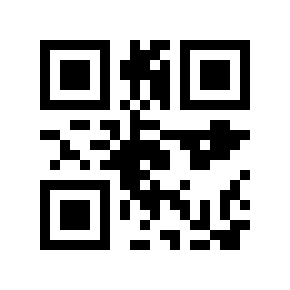
ModuleCanvas first reserves the three finder patterns, separators, timing patterns and format-information areas. Applicable larger versions also receive alignment and version information. It traverses the remaining grid in paired columns, alternating direction and avoiding reserved modules. The data and parity bits share this placement path. A dark square on the finished image is therefore not enough to identify whether it came from a payload bit or a structural pattern.
The encoder evaluates eight mask candidates. A mask XORs selected data-region modules to change the visual pattern without changing the decoded payload; function patterns remain fixed. Each candidate receives a penalty score, and format bits identify the chosen mask and error-correction level. This run selected mask 6. All eight forced masks separately decoded to ABC123 in the verification run.
Preserve the blank border
The QR wrapper adds four white modules on each side. The symbol itself is 21 modules across; 21 + 4 + 4 = 29. At ten pixels per module the image is 290 pixels square. DENSO WAVE’s guidance specifies this four-module quiet zone, so it belongs in the geometry rather than being treated as optional page decoration.
The version is fixed by the caller. In this revision, a message that exceeds the chosen data capacity makes the codeword encoder return an empty array; the wrapper can still draw a plausible-looking symbol. Part 6 demonstrates that failure. Construct a fresh QR object for a proof run and capture coordinates once, because serialization methods mutate internal buffers.