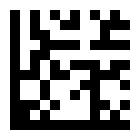
Data Matrix uses a different route to the same message. For ABC123, this implementation’s default C40 mode packs triples of characters into pairs of bytes. The resulting five data codewords fit a symbol whose data region is only 10 × 10 modules. Borders and whitespace make the final image larger than that region.
Pack three values into two bytes
In the basic C40 set, space is 3, digits 0–9 are 4–13, and uppercase A–Z are 14–39. The encoder begins with the C40 latch E6. Each triple then becomes 1600 × first + 40 × second + third + 1, split into its high and low bytes.
ABC → 14, 15, 16
1600 × 14 + 40 × 15 + 16 + 1 = 23017 = 0x59E9

123 → 5, 6, 7
1600 × 5 + 40 × 6 + 7 + 1 = 8248 = 0x2038

Initial codewords: E6 59 E9 20 38
These five bytes exactly fill the selected capacity, so this example does not need an unlatch or padding. When capacity remains, the code can append FE to return to ASCII, then 81 and position-dependent padding. For example, explicit ASCII mode encodes ABC123 as 42 43 44 32 33 34; its eight-codeword capacity is filled with 81 38 before parity is added.
Add parity before assigning coordinates
C40 data     E6 59 E9 20 38
Parity       ED 64 A2 61 46 E4 89
Total        5 data + 7 parity = 12 codewords = 96 bits
Data Matrix uses GF(256) with reduction polynomial 0x12D and first generator root 2 in this source. That differs from the QR field setup. Sharing the Reed–Solomon implementation does not make the parity bytes interchangeable between barcode families.
Place eight bits in Utah patterns
ModuleCanvas visits the data area diagonally. At each available location it places the eight bits of a codeword in a small Utah pattern; the source enumerates the least-significant bit first. Coordinates that cross the region boundary wrap according to the placement rules, and separate corner patterns handle special boundary cases. The algorithm then inserts the surrounding finder and timing borders. The left and bottom edges are solid, while the other edges alternate to establish the grid.
When a larger symbol has multiple data regions, the code offsets positions to make room for each region’s border. The 72-character ASCII example in the trace has a two-by-two arrangement of 16-module data regions. Its full width is 2 × (16 + 2) + 2 = 38 modules, including the exterior quiet zone.
Calculate the complete image size
ABC123 in C40
Data region                 10 × 10
Region plus finder border   12 × 12
With one-module quiet zone  14 × 14
At 10 pixels per module     140 × 140 pixels

General full width:
regionsPerSide × (dataRegionWidth + 2) + 2
The current DataMatrix.getEdgeLength() returns dataRegionWidth + 2. For this example it reports 12 even though emitted coordinates need a 14-module canvas including whitespace. For the four-region example it reports 18 while the complete canvas needs 38. The proof runner computes the full size from symbolInfo, following the same dimensions used by the source’s text-rendering path. This is a rendering adapter around the unchanged encoder.
Mode names need to match the implementation
The internal mode values are 0x10 for ASCII, 0x11 for C40, 0x12 for Text and 0x13 for X12. The separately exported Encoding object uses 0, 1, 2 and 3, which do not match those dispatch values. The examples therefore pass the numeric internal mode explicitly. Text mode encodes abc123 with an EF latch; X12 encodes ABC123 with EE. Both examples decoded correctly, but unsupported X12 characters are silently replaced with spaces. ASCII mode also strips the high bit of each UTF-8 byte. Part 6 shows the resulting data loss.
This is an ordinary Data Matrix example containing ABC123. It is not a GS1 payload and does not demonstrate FNC1 or Application Identifier processing.